
Steffen Hi, the name's Steffen and I'm writing about the Web, programming and all those things coming to my mind. Enjoy your stay.

I'm currently working on fabidoo.com - 3D Printing for everyone!

ShadedBorder with Gradients

The new version 0.3 of ShadedBorder supports gradient backgrounds:
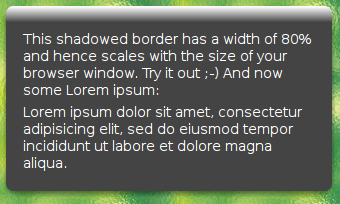
ShadedBorder with Background Gradient

Have a look at the updated example.

The new feature is quite intuitive to use. You need some one pixel wide gradient background image with any height you like, which when repeated in x direction gives you your gradient (grad.png). All you need to know is the color of the last (bottom most) pixel in this image, let it be #444444 a dark gray in this example.

Then simply add the following rule for each of the elements which should be “bordered” to your CSS style sheet:

#shadowed-border .sb-inner { background:#444444 url(grad.png) repeat-x; }

That’s it. Thanks to Piotr for reminding me that this feature was missing ;-) And thanks to all you guys answering questions in the comments section of ShadedBorder - it’s getting kind of a forum, right? :-)

While touching the code I also added an optimization which results in much less DIVs generated and should give quite some speed improvements.

Tags: , , ,

13 Responses to “ShadedBorder with Gradients”

< Prev 1 2 Show All

  • 11
    Charles Manske Says:

    I use jQuery for most things, but I really like the style and size of this code for corners and gradients. A common pattern for rendering corners for all elements of a particular class is:
    var border = RUZEE.ShadedBorder.create(…);
    border.render($(’.my_border_class’).get()); /* Use get() to return array of DOM elements */

    But I’m seeing an ugly problem when a page is resized in IE7 (Windows XP). You can see it on the example page: http://www.ruzee.com/files/shadedborder/test.html
    Resize the window from the bottom-right corner to make it smaller and watch what happens to the “A headline With Its Own Style” box. Both of the right corners become dislocated and shift to the right or disappear completely. Also, if the window is very narrow, the central div in that box (the one that ends up with 100% height in the final render) is not extended correctly and the background shows through. These obviously stem from the classic IE “box” rendering bugs.
    Just in case some of you aren’t using Firefox, developing in Firefox with the Firebug plugin is by far the best way to debug styles, since you can inspect ALL of the rendered divs. If only that worked in IE!

  • 12
    David Felton Says:

    Any progress on solving the full-height gradient bug? I want to use some quite short rounded divs for title bars but the gradient disappears on the bottom half because of this.

  • 13
  • < Prev 1 2 Show All

    Leave a Reply

67731